
How to check wallet history in depth
Managing your wallet balance and keeping track of transactions is important to stay updated with your usage. In IVR Solutions, you can easily view the complete history of your wallet, including credits, debits, and deductions.
Steps to Check Wallet History
- Login to your account – Open app.ivrsolutions.in and sign in using your registered email ID and password.
- From the left-hand side menu, click on My Wallet(Billing section).
3. Select Wallet History to see all your past transactions.

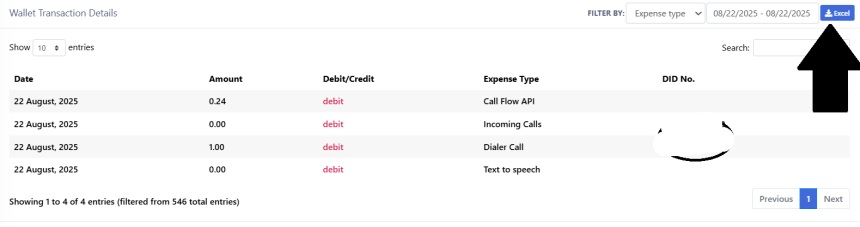
4. View Transaction Details – Each entry shows the date, time, type (credit/debit), amount, and transaction description.

5. Use Filters (Optional) – Apply filters like date range or transaction type to quickly find specific records.

6. Download for your use – Download the report in excel format for your reference.
How to Set Up a Basic Call Flow in IVRSolutions
A call flow defines what happens when a customer dials your number. It determines whether...
How to Add and Manage Audio in the IVRSolutions Panel
Audio messages are the backbone of your IVR system. They are used to greet customers, play...
How to Add Agents to Your IVRSolutions Panel (Step-by-Step)
In this tutorial we will guide you on how you can add agents in Ivr Solutions through your...
What to Do When Calls Are Not Working in IVRSolutions
Sometimes you or your agents may face issues where calls are not connecting, dropping, or...