
How to Set Up a Basic Call Flow in IVRSolutions
A call flow defines what happens when a customer dials your number. It determines whether they hear a welcome greeting, get directed to a department, or enter details before speaking to an agent. In IVRSolutions, a Basic Call Flow is the simplest way to manage calls — allowing you to set up “press key” options like Press 1 for Sales, Press 2 for Support. This blog will walk you through what a basic call flow is, how to set it up, and when to use it.
What is a Basic Call Flow?
A Basic Call Flow lets you quickly build a simple IVR menu. Instead of complex integrations or conditions, it’s designed for straightforward routing.
Examples:
- Press 1 for Sales, Press 2 for Support
- Dial extension directly to reach an agent
- Wait on the line to connect with the operator
It’s perfect for small teams or businesses that need quick call redirection without advanced automation.
Let's understand how to create Basic Call Flow:
Step 1: Go to Call Flow Section
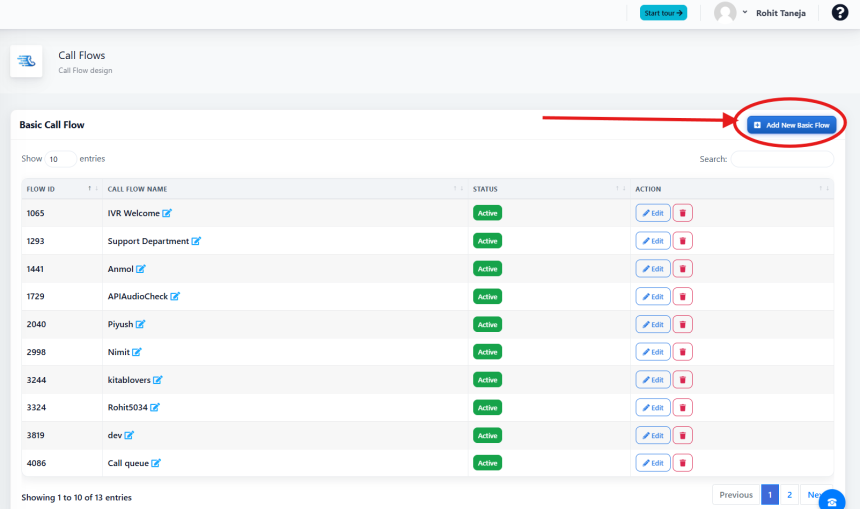
Login to your IVRSolutions admin panel and open the Call Flow tab. This is where all your call flows are created and managed.
Step 2: Click on Add New Basic Flow.
Step 3: Fill in Required details
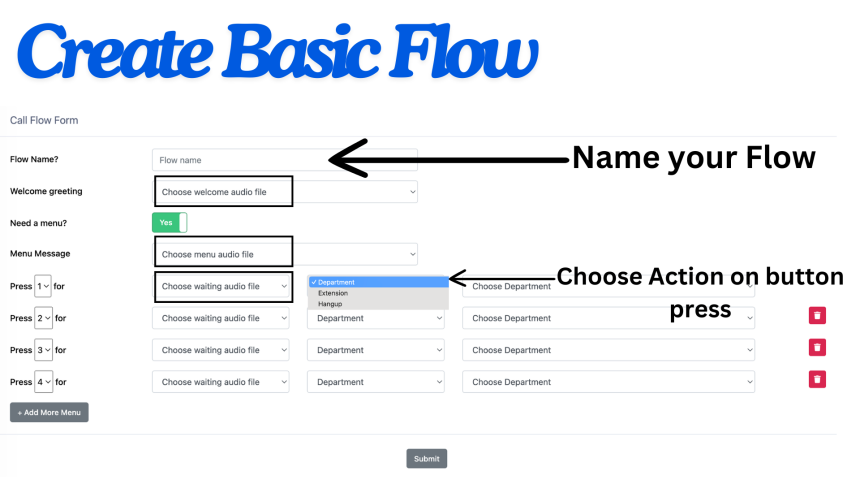
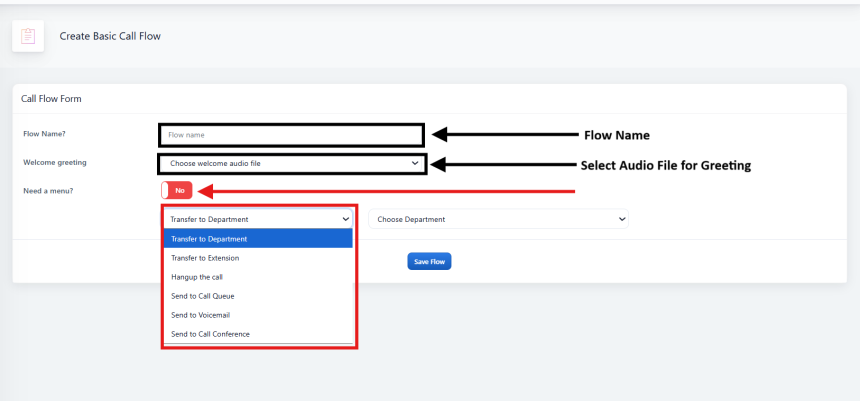
- Flow Name (Name you want to assign to this call flow)
- Welcome Greeting - Audio which you want your listeners to hear when they call.
- Need a Menu
a) Yes - If you want your listener to press buttons to make selection (Example - Press 1 for sales, Press 2 for support)
- Menu Message: Select Audio File which you want to play for Menu Message (Example - Press 1 for sales, Press 2 for support)
- Press Buttons: Select Actions which you want when customer presses the button.
b) No - If you want your listener to directly connect to department/agent/extension/Call Queue/Call Conference, etc. (Call will directly go through after welcome tone in this case).
Step 4: Save and Test Your Flow
Once actions are added, click Save.
- Place a test call to the assigned number after adding the call flow in DID settings.
- Confirm that keypad inputs work as expected (e.g., 1 goes to Sales, 2 goes to Support).
Why Use a Basic Call Flow?
- Easy Setup – Quick to configure for small teams.
- Customer Clarity – Callers get directed instantly.
- Scalable – Can later be upgraded to Advanced Call Flows with API integrations.
Conclusion
A Basic Call Flow is the simplest way to handle customer calls professionally. With just a few clicks, you can create menu options, route callers, and even add validation. This ensures every call gets to the right place quickly.
How to Manage Working Hours of Agents in Your IVRSolutions Panel
Managing agent working hours is essential to ensure that calls are routed only when your t...
How to Use the "Login as Agent" Option in Your IVRSolutions Panel
Sometimes, administrators need to see exactly what an agent is experiencing inside the IVR...
Advanced Call Flow Features in IVRSolutions
While a Basic Call Flow is useful for simple “Press 1 for Sales, Press 2 for Support” menu...
How to Edit or Delete Agents in Your IVRSolutions Panel
After adding agents to your IVRSolutions panel, you may sometimes need to update their det...