
How to Use the "Login as Agent" Option in Your IVRSolutions Panel
Sometimes, administrators need to see exactly what an agent is experiencing inside the IVRSolutions panel. The Login as Agent feature allows you to do just that. It lets admins temporarily access an agent’s panel without needing their login credentials. This option is especially useful for troubleshooting, testing configurations, and verifying agent details. In this guide, we’ll walk you through how to use the “Login as Agent” option and explain its most common use cases.
Sometimes, administrators need to see exactly what an agent is experiencing inside the IVRSolutions panel. The Login as Agent feature allows you to do just that. It lets admins temporarily access an agent’s panel without needing their login credentials. This option is especially useful for troubleshooting, testing configurations, and verifying agent details. In this guide, we’ll walk you through how to use the “Login as Agent” option and explain its most common use cases.
Start by logging in to your IVRSolutions admin account with your registered email and password.
 Step 2: Navigate to the Agents Section
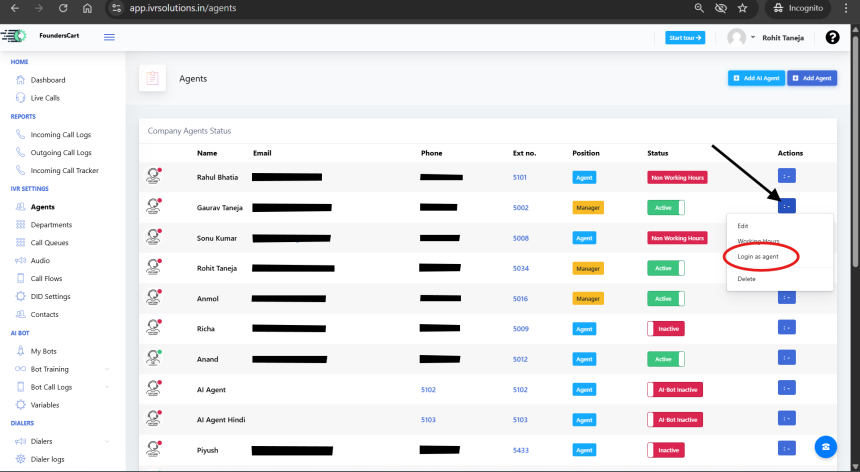
Click on the Agents tab in the left-hand menu. This will open the list of all agents currently added to your panel.
 Step 3: Choose the Agent
From the list, locate the agent whose account you want to access.
 Step 4: Click on “Login as Agent”
Next to the agent’s details, click on the Login as Agent option. This will instantly log you into the system as that particular agent. You’ll see their dashboard, menus, and permissions exactly as they do.
 Step 5: Use Cases of “Login as Agent”
The “Login as Agent” feature is primarily used for:
- Troubleshooting Issues – If an agent reports missing options or errors, admins can log in to replicate the issue.
- Verifying Agent Settings – Quickly check if extensions, roles, or permissions are applied correctly.
- Testing Call Flows – Ensure call routing works properly from the agent’s perspective.
- Training Support – Show new agents how their dashboard works by demonstrating directly.
 Conclusion
The Login as Agent option is a powerful tool for administrators to diagnose problems, verify configurations, and provide effective support to team members. By seeing the panel exactly as the agent does, you save time and resolve issues faster.
For more tutorials and guides, visit learn.ivrsolutions.in
How to check wallet history in depth
Managing your wallet balance and keeping track of transactions is important to stay update...
How to Manage Working Hours of Agents in Your IVRSolutions Panel
Managing agent working hours is essential to ensure that calls are routed only when your t...
How to Add Agents to Your IVRSolutions Panel (Step-by-Step)
In this tutorial we will guide you on how you can add agents in Ivr Solutions through your...
Advanced Call Flow Features in IVRSolutions
While a Basic Call Flow is useful for simple “Press 1 for Sales, Press 2 for Support” menu...